| Previous | Next
RDDL SyntaxA RDDL document is an XHTML Basic document, plus one new element, In addition, a RDDL document contains one new element, A Recall the person vocabulary used several times in this tutorial. When last seen in , it looked as shown in Example 14-1. All elements in this document are in the default namespace http://www.cafeconleche.org/namespaces/people. Example 14-1. An XML document describing two people that uses a default namespace<?xml version="1.0"?> <people xmlns="http://www.cafeconleche.org/namespaces/people"> <person born="1912" died="1954"> <name> <first_name>Alan</first_name> <last_name>Turing</last_name> </name> <profession>computer scientist</profession> <profession>mathematician</profession> <profession>cryptographer</profession> </person> <person born="1918" died="1988"> <name> <first_name>Richard</first_name> <middle_initial>P</middle_initial> <last_name>Feynman</last_name> </name> <profession>physicist</profession> <hobby>Playing the bongoes</hobby> </person> </people> Various chapters have developed stylesheets, DTDs, and (still-to-come) schemas for this application. Example 14-2 is a very simple RDDL document that brings these all together. This document should be placed at the namespace for that application, http://www.cafeconleche.org/namespaces/people. The Example 14-2. A RDDL document<!DOCTYPE html PUBLIC "-//XML-DEV//DTD XHTML RDDL 1.0//EN" "http://www.rddl.org/rddl-xhtml.dtd"> <html xmlns="http://www.w3.org/1999/xhtml" xmlns:xlink="http://www.w3.org/1999/xlink" xmlns:rddl="http://www.rddl.org/"> <head> <title>An XML Application Describing People</title> </head> <body> <h1>An XML Application Describing People</h1> <rddl:resource xlink:type="simple" xlink:href="urn:" xlink:role="http://dublincore.org/documents/dcmi-type-vocabulary/#text" xlink:arcrole="http://www.rddl.org/purposes#normative-reference"> <p> http://www.cafeconleche.org/namespaces/people is the namespace URL for an XML application describing people in a data-oriented fashion used as an example in <cite>XML tutorial</cite>, second version by Elliotte Rusty Harold and W. Scott Means (Anonymous & Associates, 2002). </p> </rddl:resource> <h2>Related Resources</h2> <p> Several examples in this tutorial address this application in one way or another. These include: </p> <ul> <li> <rddl:resource xlink:type="simple" xlink:href="http://web.archive.org/web/www.cafeconleche.org/tutorials/xian2/examples/03/3-5.dtd" xlink:role="http://www.isi.edu/in-notes/iana/assignments/media-types/application/xml-dtd" xlink:arcrole="http://www.rddl.org/purposes#validation"> <a href="http://web.archive.org/web/www.cafeconleche.org/tutorials/xian2/examples/03/3-5.dtd"> Example 3-5</a>: A data oriented DTD describing people </rddl:resource> </li> <li> <rddl:resource xlink:type="simple" xlink:href="http://web.archive.org/web/www.cafeconleche.org/tutorials/xian2/examples/08/8-15.xsl" xlink:role="http://www.w3.org/1999/XSL/Transform" xlink:arcrole="http://www.isi.edu/in-notes/iana/assignments/media-types/text/html"> <a href="http://web.archive.org/web/www.cafeconleche.org/tutorials/xian2/examples/08/8-15.xsl"> Example 8-15</a>: An XSLT stylesheet for people documents </rddl:resource> </li> </ul> <p> This document itself is <a href="http://web.archive.org/web/www.cafeconleche.org/tutorials/xian/examples/14/14-2.html"> Example 14-2</a> from the RDDL chapter. </p> </body> </html> 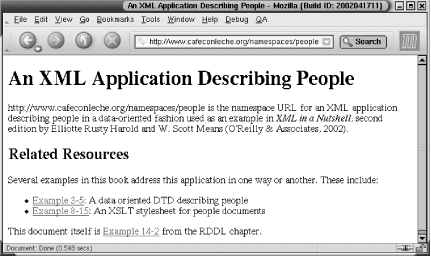
Figure 14-1. To a web browser, a RDDL document is just another HTML documentThis document contains three The second The final This is a very simple example. A real-world RDDL document would contain a lot more HTML to tell people reading it in a browser just what the application was about. Machines will ignore the HTML and look at the |