CGI Output
Every CGI script must print a header line, which the server uses to build the full HTTP headers of its response. If your CGI script produces invalid headers or no headers, the web server will generate a valid response for the client -- generally a Internal Server Error message.
Your CGI has the option of displaying full or partial headers. By default, CGI scripts should return only partial headers.
Partial Headers
CGI scripts must output one of the following three headers:
- A Content-type header specifying the media type of the content that will follow
- A Location header specifying a URL to redirect the client to
- A Status header with a status that does not require additional data, such as No Response
Let's review each of these options.
Outputting documents
The most common response for CGI scripts is to return HTML. A script must indicate to the server the media type of content it is returning prior to outputting any content. This is why all of the CGI scripts you have seen in the previous examples contained the following line:
print "Content-type: text/html\n\n";
You can send other HTTP headers from a CGI script, but this header field is the minimum necessary in order to output a document. HTML documents are by no means the only form of media type that may be outputted by CGI scripts. By specifying a different media type, you can output any type of document that you can imagine. For example, Example 3-4 later in this chapter shows how to return a dynamic image.
The two newlines at the end the Content-type header tell the web server that this is the last header line and that subsequent lines are part of the body of the message. This correlates to the extra CRLF that we discussed in the last chapter, which separates HTTP headers from the content body (see the upcoming sidebar, the sidebar "Line Endings").
Line Endings
Many operating systems use different combinations of line feeds and carriage returns to represent the end of a line of text. Unix systems use a line feed; Macintosh systems use a carriage return; and Microsoft systems use both a carriage return and a line feed, often abbreviated as CRLF. HTTP headers require a CRLF as well -- each header line must end with a carriage return and a line feed.
In Perl (on Unix), a line feed is represented as "
n", and a carriage return is represented as "r". Thus, you may wonder why our previous examples have included this:print "Content-type: text/html\n\n";and not this:
print "Content-type: text/html\r\n\r\n";The second format would work, but only if your script runs on Unix. Because Perl both began on Unix and has become a cross-platform language, printing
"\n"in a script will always output the operating system's default line ending.There is a simple solution. CGI requires that the web server translate your operating system's conventional line ending into a CRLF for you. Thus for the sake of portability, it is always best practice to print a simple line feed ("
n"): Perl will output the operating system's default line ending, and the web server will automatically convert this to the CRLF required by HTTP.
Forwarding to another URL
Sometimes, it's not necessary to build an HTML document with your CGI script. In fact, unless the output varies from one visit to another, it is a good idea to create a simple, static HTML page (in addition to the CGI script), and forward the user to that page by using the Location header. Why? Interface changes are far more common than program logic changes, and it is much easier to reformat an HTML page than to make changes to a CGI script. Plus, if you have multiple CGI scripts that return the same message, then having them all forward to a common document reduces the number of resources you need to maintain. Finally, you get better performance. Perl is fast, but your web server will always be faster. It's a good idea to take advantage of any opportunity you have to shift work from your CGI scripts to your web server.
To forward a user to another URL, simply print the Location header with the URL to the new location:
print "Location: static_response.html\n\n";
The URL may be absolute or relative. An absolute URL or a relative URL with a relative path is sent back to the browser, which then creates another request for the new URL. A relative URL with a full path produces an internal redirect. An internal redirect is handled by the web server without talking to the browser. It gets the contents of the new resource as if it had received a new request, but it then returns the content for the new resource as if it is the output of your CGI script. This avoids a network response and request; the only difference to users is a faster response. The URL displayed by their browser does not change for internal redirects; it continues to show the URL of the original CGI script. See Figure 3-4 for a visual display of server redirection. 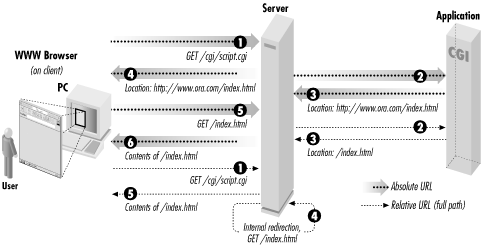
Figure 3-4. Server redirection
When redirecting to absolute URLs, you may include a Content-type header and content body for the sake of older browsers, which may not forward automatically. Modern browsers will immediately fetch the new URL without displaying this content.
Specifying status codes
The Status header is different than the other headers because it does not map directly to an HTTP header, although it is associated with the status line. This field is used only to exchange information between the CGI script and the web server. It specifies the status code the server should include in the status line of the request. This field is optional: if you do not print it, the web server will automatically add a status of OK to your output if you print a Content-type header, and a status of Found if you print a Location header.
If you do print a status code, you are not bound to use the status code's associated message, but you should not try to use a status code for something other than for which it was intended. For example, if your CGI script must connect to a database in order to generate its output, you might return Database Unavailable if the database has no free connections The standard error message for messages is Service Unavailable , so our database message is an appropriately similar use of this status code.
Whenever you return an error status code, you should also return a Content-type header and a message body describing the reason for the error in human terms. Some browsers provide their own messages to users when they receive status codes indicating an error, but most do not. So unless you provide a message, many users will get an empty page or a message telling them "The document contains no data." If you don't want to admit to having a problem, you can always fall back to the ever-popular slogan, "The system is currently unavailable while we perform routine maintenance."
Here is the code to report our database error:
print <<END_OF_HTML; Status: 503 Database Unavailable Content-type: text/html <HTML>
<HEAD><TITLE>503 Database Unavailable</TITLE></HEAD>
<BODY>
<H1>Error</H1>
<P>Sorry, the database is currently not available. Please try again later.</P>
</BODY>
</HTML> END_OF_HTML
Below is a short description of the common status headers along with when (and whether) to use them in your CGI scripts:
- 200 OK
- 200 is by far the most common status code returned by web servers; it indicates that the request was understood, it was processed successfully, and a response is included in the content. As we discussed earlier, the web server automatically adds this header when you print the required Content-type header, so the only time you need to print this status yourself is to output complete nph- headers, which we discuss in the next section.
- 204 No Response
- 204 indicates that the request was okay, it was processed successfully, but no response is provided. When a browser receives this status code, it does nothing. It simply continues to display whatever page it was displaying before the request. A 200 response without a content body, on the other hand, may produce a "Document contains no data" error in the user's browser. Web users generally expect feedback, but there are some instances when this response (or lack of response) makes sense. One example is a situation when you need client code such as JavaScript or Java to report something to the web server without updating the current page.
- 301 Moved Permanently
- 301 indicates that the URL of the requested resource has changed. All 300-level responses must contain a Location header field specifying a new URL for the resource. If the browser receives a 301 response to a GET request, it should automatically fetch the resource from the new location. If the browser receives a 301 response to a POST request, however, the browser should confirm with the user before redirecting the POST request. Not all browsers do this, and many even change the request method of the new request to GET.
Responses with this status code may include a message for the user in case the browser does not handle redirection automatically. Because this status code indicates a permanent move, a proxy or a browser that has a cached copy of this response will simply use it in the future instead of reconfirming the change with the web server.
- 302 Found
- 302 responses function just like 301 responses, except that the move is temporary, so browsers should direct all future requests to the original URL. This is the status code that is returned to browsers when your script prints a Location header (except for full paths, see "Forwarding to another URL" earlier). As with 301 status codes, browsers should check with the user before forwarding a POST request to another URL. Because the 302 status has become so popular, and because so many browsers have been guilty of silently changing POST requests to GET requests during the redirect, HTTP/1.1 more or less gave up on trying to get compliance on this status code and defines two new status codes: See Other and Temporary Redirect.
- 303 See Other
- 303 is new for HTTP/1.1. It indicates that the resource has temporarily moved and that it should be obtained from the new URL via a GET request, even if the original request method was POST. This status code allows the web server (and the CGI script developer) to explicitly request the incorrect behavior that 302 responses caused in most browsers.
- 307 Temporary Redirect
- 307 is new for HTTP/1.1. It also indicates a temporary redirection. However, HTTP/1.1 browsers that support this status code must prompt the user if they receive this status code in response to a POST request and must not automatically change the request method to GET. This is the same behavior required for 302 status codes, but browsers that implement this code should actually do the right thing.
Thus 302, 303, and 307 all indicate the same thing except when the request was a POST. In that case, the browser should fetch the new URL with a GET request for 303, confirm with the user and then fetch the new URL with a POST request for 307, and do either of those for 302.
- 400 Bad Request
- 400 is a general error indicating that the browser sent an invalid request due to bad syntax. Examples include an invalid Host header field or a request with content but without a Content-type header. You should not have to return a 400 status because the web server should recognize these problems and reply with this error status code for you instead of calling your CGI script.
- 401 Unauthorized
- 401 indicates that the requested resource is in a protected realm. When browsers receive this response, they should ask the user for a login and password and resend the original request with this additional information. If the browser again receives a 401 status code, then the login was declined. The browser generally notifies the user and allows the user to reenter the login information. 401 responses should include a WWW-Authenticate header field indicating the name of the protected realm.
The web server handles authentication for you (although mod_perl lets you dig into it if you wish) before invoking your CGI scripts. Therefore, you should not return this status code from CGI scripts; use Forbidden instead.
- 403 Forbidden
- 403 indicates that the client is not allowed to access the requested resource for some reason other than needing a valid HTTP login. Remember reading in "Getting Started ", that CGI scripts must have the correct permissions set up in order to run? Your browser will receive a 403 status if you attempt to run CGI scripts that do not have the correct execute permissions.
You might return this status code for certain protected CGI scripts if the user fails to meet some criteria such as having a particular IP address, a particular browser cookie, etc.
- 404 Not Found
- Undoubtedly, you have run across this status code. It's the online equivalent of a disconnected phone number. 404 indicates that the web server can't find the resource you asked for. Either you misentered a URL or you followed a link that is old and no longer accurate.
You might use this status code in CGI scripts if the user passes extra path information that is invalid.
- 405 Not Allowed
- 405 indicates that the resource requested does not support the request method used. Some CGI scripts are written to support only POST requests or only GET requests. This status would be an appropriate response if the wrong request method is received; in practice, this status code is not often used. 405 replies must include an Allow header containing a list of valid request methods for the resource.
- 408 Request Timed Out
- When a transaction takes a long time, the web browser usually gives up before the web server. Otherwise, the server will return a 408 status when it has grown tired of waiting. You should not return this status from CGI scripts. Use Gateway Timed Out instead.
- 500 Internal Server Error
- As you begin writing CGI scripts, you will become far too familiar with this status. It indicates that something happened on the server that caused the transaction to fail. This almost always means a CGI script did something wrong. What could a CGI script do wrong you ask? Lots: syntax errors, runtime errors, or invalid output all might generate this response. We'll discuss strategies for debugging unruly CGI scripts in "Debugging CGI Applications".
- 503 Service Unavailable
- 503 indicates that the web server is unable to respond to the request due to a high volume of traffic. These responses may include a Retry-After header with the date and time that the browser should wait until before retrying. Generally web servers manage this themselves, but you might issue this status if your CGI script recognizes that another resource (such as a database) required by the script has too much traffic.
- 504 Gateway Timed Out
- 504 indicates that some gateway along the request cycle timed out while waiting for another resource. This gateway could be your CGI script. If your CGI script implements a time-out handler when calling another resource, such as a database or another Internet server, then it should return a 504 response.
We list these status codes here to be complete, but keep in mind that you do not have to print your own status code, even for errors. Although sending a status code to report an error might be the most appropriate action according to the HTTP protocol, you may prefer to simply redirect users to a help page or return a summary of the error as normal output (with a OK status).
Complete (Non-Parsed) Headers
Thus far, all the CGI scripts that we've discussed simply return partial header information. We leave it up to the server to fill in the other headers and return the document to the browser. We don't have to rely on the server though. We can also develop CGI scripts that generate a complete header.
CGI scripts that generate their own headers are called nph (non-parsed headers) scripts. The server must know in advance whether the particular CGI script intends to return a complete set of headers. Web servers handle this differently, but most recognize CGI scripts with a nph- prefix in their filename.
When sending complete headers, you must at least send the status line plus the Content-type and Server headers. You must print the entire status line; you should not print the Status header. As you will recall, the status line includes the protocol and version string (e.g., "HTTP/1.1"), but as you should recall, CGI provides this to you in the environment variable SERVER_PROTOCOL. Always use this variable in your CGI scripts, instead of hardcoding it, because the version in the SERVER_PROTOCOL may vary for older clients.
Example 3-3 provides a simple example that illustrates nph scripts.
Example 3-3. nph-count.cgi
#!/usr/bin/perl -wT use strict;
print "$ENV{SERVER_PROTOCOL} 200 OK\n";
print "Server: $ENV{SERVER_SOFTWARE}\n";
print "Content-type: text/plain\n\n";
print "OK, starting time consuming process ... \n"; # Tell Perl not to buffer our output $| = 1;
for ( my $loop = 1; $loop <= 30; $loop++ ) {
 print "Iteration: $loop\n"; ## Perform some time consuming task here ## sleep 1;
}
print "All Done!\n";
nph scripts were more common in the past, because versions of Apache prior to 1.3 buffered the output of standard CGI scripts (those generating partial headers) but did not buffer the output of nph scripts. By creating nph scripts, your output was sent immediately to the browser as it was generated. However Apache 1.3 no longer buffers CGI output, so this feature of nph scripts is no longer needed with Apache. Other web servers, such as iPlanet Enterprise Server 4, buffer both standard CGI as well as nph output. You can find out how your web server handles buffering by running Example 3-3.
Save the file as nph-count.cgi and access it from your browser; then save a copy as count.cgi and update it to output partial headers by commenting out the status line and the Server header:
# print "$ENV{SERVER_PROTOCOL} 200 OK\n"; # print "Server: $ENV{SERVER_SOFTWARE}\n";
Access this copy of the CGI script and compare the result. If your browser pauses for thirty seconds before displaying the page, then the server is buffering the output; if you see the lines displayed in real time, then it is not.