Database Integration
The HTTP listener and PL/SQL gateway are used to build web-enabled systems that provide tight integration with a backend Oracle database. PL/SQL-based OAS and WebDB applications are developed using a set of packages called the PL/SQL toolkit. In this section, we'll take a quick look at the toolkit and see an example procedure. The last section covers how to pass parameters.
The PL/SQL Toolkit
WebDB and OAS both include the PL/SQL toolkit. The toolkit contains a variety of PL/SQL packages written and supplied by Oracle that perform a range of tasks, including generating HTML tags, manipulating cookies (name/value pairs used to save information throughout an entire session), and creating complex HTML structures based on information in a database table. In general, procedures built with the toolkit will work in either product, although you may run into minor database privilege issues that the DBA can help you resolve.
The packages in the toolkit (described in detail in ) are:
- HTP and HTF
- HTP is a set of procedures that print syntactically correct HTML tags, which are returned to the user's web browser. HTF is an equivalent set of functions that return HTML strings whose output is returned to the program that called the function. In either package, procedures and functions correspond to specific HTML tags; their parameters correspond to tag attributes.
- OWA_COOKIE
- A set of data structures, procedures, and functions used to create and manipulate cookies.
- OWA_IMAGE
- A set of data structures, procedures, and functions used to manipulate image maps.
- OWA_OPT_LOCK
- A set of data structures, procedures, and functions used to perform optimistic record locking. The package can either compute a checksum that's used to test for differences or compare each field of the old and new records (we'll look at this in detail in ).
- OWA_PATTERN
- A set of data structures, procedures, and functions that perform advanced search and replace operations on text strings using regular expressions.
- OWA_SEC
- A set of data structures, procedures, and functions used to develop customized security and authentication procedures, such as GET_USER_ID (to return the user executing the procedure) or GET_CLIENT_IP (to return the IP address of the machine making the request).
- OWA_TEXT
- A set of data structures, procedures, and functions used to perform operations on large strings. Also used as the basis of many of the procedures in OWA_PATTERN.
- OWA_UTIL
- A set of data structures, procedures, and functions used to create advanced HTML structures, such as calendars or tables. Many of the WebDB components, such as forms or calendars, are based directly on this package.
PL/SQL Example
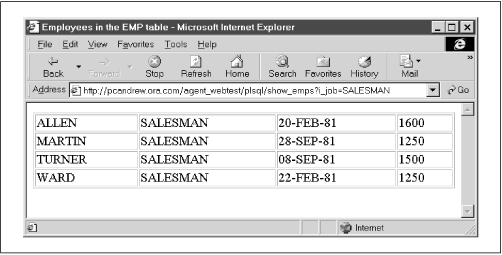
The following example gives the flavor of how the toolkit creates web content. The example is a relatively simple PL/SQL procedure that displays rows in an employee table. The output is formatted into HTML using the procedures in the toolkit's HTP package:
/* Formatted by PL/Formatter v.1.1.13 */ PROCEDURE show_emps ( i_job IN VARCHAR2 DEFAULT 'SALESMAN' ) AS CURSOR emp_cur IS SELECT * FROM scott.emp WHERE job LIKE i_job ORDER BY ename; emp_rec emp_cur%ROWTYPE; BEGIN HTP.title ('Employees in the EMP table'); HTP.tableopen (cattributes => 'border=1 width=100%'); OPEN emp_cur; LOOP FETCH emp_cur INTO emp_rec; EXIT WHEN emp_cur%notfound; HTP.tablerowopen; HTP.tabledata (emp_rec.ename); HTP.tabledata (emp_rec.job); HTP.tabledata (emp_rec.hiredate); HTP.tabledata (emp_rec.sal); HTP.tablerowclose; END LOOP; CLOSE emp_cur; HTP.tableclose; END;
Figure 2.2 shows the output from the procedure. For a more advanced discussion of the PL/SQL toolkit, see .
Figure 2.2: Output of the show_emps procedure
Calling the Example
You can pass parameters to a WebDB or an OAS PL/SQL procedure by including them either in the query string of a URL or as named elements on an HTML form. These parameters are mapped to the procedure's formal argument list using named notation. For example, let's suppose we want to develop a web page that inserts a new user into a table. The procedure we want to call is defined as:
/* Formatted by PL/Formatter v.1.1.13 */ PROCEDURE add ( lname IN VARCHAR2 DEFAULT NULL, fname IN VARCHAR2 DEFAULT NULL, dpt_code IN VARCHAR2 DEFAULT NULL ) IS BEGIN INSERT INTO emp_table (last_name,first_name,dept) VALUES (lname, fname, dpt_code); COMMIT; HTP.print ('User was inserted'); EXCEPTION WHEN OTHERS THEN HTP.print ('Sorry, could not insert user.'); END;
Using a query string
The first way to call the procedure is to embed the parameter values in the URL's query string. Recall that the query string is made up of sets of name/value pairs. When we call a PL/SQL procedure, the "name" part of the pair selects the formal parameter to which we are assigning a value. The "value" part specifies the actual value to pass. The URL to call the procedure is:
http://server/DAD/add?lname=odewahn&fname=andrew&dpt_code=MIS
Using an HTML form
We can call the same procedure with an HTML form. In this case, the form's action field specifies the procedure to execute, and the named input elements on the HTML form pass parameters. The name of an input element must match the name of a parameter to the procedure. Here are the HTML tags needed to create a form to call the add procedure:
<form action=http://wilma/hr/plsql/add> First Name: <input type=text name=fname><br> Last Name: <input type=text name=lname><br> Department: <select name=dpt_code>
<option value=HR>Human Resources <option value=MIS>Computer department <option value=ACCT>Accounting </select>
</form>
TIP: The PL/SQL gateway translates the information in the query string or on the form to a named notation procedure call:
add ( lname => 'odewahn', fname => 'andrew', dpt_code => 'MIS' );
Parameter arrays
Sometimes it is desirable to process multiple values for the same parameter, such as when you want to allow a user to enter multiple rows of data in a single form. In a query string, this is accomplished by giving the same name to multiple name/value pairs. In a form, it is accomplished by using the same name for multiple input elements. On the PL/SQL side, the corresponding parameter for the procedure must be declared as an array datatype. We'll see an example of this in .
Parameter gotchas
Calling a procedure from the Web circumvents the compiler safeguards that occur in normal procedure calls. When the gateway receives a URL to execute, it will try to do so whether the URL represents a syntactically correct call or not. If the call contains even the slightest error, the listener bombs out and presents an ugly error page to the user. Some of the most common sources of errors are:
- Misspelling a formal parameter
- The named notation calling method uses the formal parameter name to match the corresponding actual parameter. The gateway generates an error if, for any reason, an actual parameter doesn't match one of the procedure's formal parameters.
- Omitting a required actual parameter
- All procedure calls, regardless of notation, must provide an actual parameter for a formal parameter that does not have a default value. Failing to do so results in an exception.
- Passing the wrong datatype as a parameter value
- An actual parameter value must match the declared type of its corresponding formal parameter. Unfortunately, users can create an exception by passing garbage data.
The following guidelines help minimize these and other errors:
- Follow a convention for naming formal parameters to reduce the chance of misspelling or misnaming a parameter.
- Provide default values for every formal parameter, even if it's only DEFAULT NULL, to reduce the chance that a required parameter is omitted.
- Declare parameters as a VARCHAR2 to protect against garbage data. Converting this value into the required type (i.e., VARCHAR2 to NUMBER) inside the procedure allows you to trap exceptions. You can also use the WebDB form wizard to automatically create JavaScript code to perform these checks (you can write your own JavaScript programs, but that's beyond the scope of this tutorial).
WARNING: Don't give a parameter the same name as a column in a table, as this can totally confuse the compiler. For example, in the
addprocedure presented in the previous section, naming the last name parameterlast_nameinstead oflnamewould cause a subtle error in the INSERT statement becauselast_namehas two different meanings: it's both a parameter and a table column. You can spend hours trying to track down this relatively simple problem.