Directories
Use the Directories page in the Performance tab to configure options for specific directories. This corresponds to the <Directory> directive.

Directories
Figure 23.9. Directories
Click the Edit button in the top right-hand corner to configure the Default Directory Options for all directories that are not specified in the Directory list below it. The options that you choose are listed as the Options directive within the <Directory> directive. You can configure the following options:
- ExecCGI - Allow execution of CGI scripts. CGI scripts are not executed if this option is not chosen.
- FollowSymLinks - Allow symbolic links to be followed.
- Includes - Allow server-side includes.
- IncludesNOEXEC - Allow server-side includes, but disable the
#execand#includecommands in CGI scripts. - Indexes - Display a formatted list of the directory's contents, if no
DirectoryIndex(such asindex.html) exists in the requested directory. - Multiview - Support content-negotiated multiviews; this option is disabled by default.
- SymLinksIfOwnerMatch - Only follow symbolic links if the target file or directory has the same owner as the link.
To specify options for specific directories, click the Add button beside the Directory list box. A window as shown in Figure 23.10, "Directory Settings" appears. Enter the directory to configure in the Directory text field at the bottom of the window. Select the options in the right-hand list and configure the Order directive with the left-hand side options. The Order directive controls the order in which allow and deny directives are evaluated. In the Allow hosts from and Deny hosts from text field, you can specify one of the following:
- Allow all hosts - Type
allto allow access to all hosts.
- Partial domain name - Allow all hosts whose names match or end with the specified string.
- Full IP address - Allow access to a specific IP address.
- A subnet - Such as
192.168.1.0/255.255.255.0 - A network CIDR specification - such as
10.3.0.0/16
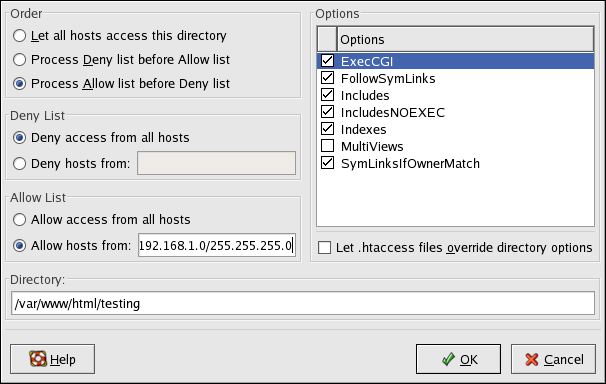
Directory Settings
Figure 23.10. Directory Settings
If you check the Let .htaccess files override directory options, the configuration directives in the .htaccess file take precedence.