Registering an Offline Consumer
Some systems may not have internet connectivity, but administrators still want to assign and track the subscriptions for that system. This can be done by manually registering the system, rather than depending on Subscription Manager to perform the registration. This has two major steps, first to create an entry on the subscriptions service and then to configure the system.
- Open the Subscriptions tab in the Customer Portal, and select the Overview item under the Certificate-Based Management area.
- In the summary of consumers, click the Register New System link to create the new inventory entry.

- Fill in the required information for the new consumer type. A system requires information about the architecture and hardware in order to ascertain what subscriptions are available to that system.
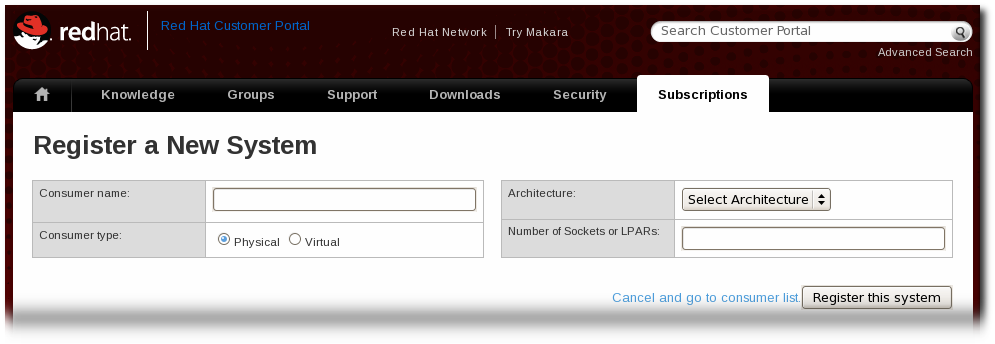
- Once the system is created, assign the appropriate subscriptions to that system.
- Open the Available Subscriptions tab.
- Click the check boxes by all of the subscriptions to assign, and then click the Add button.
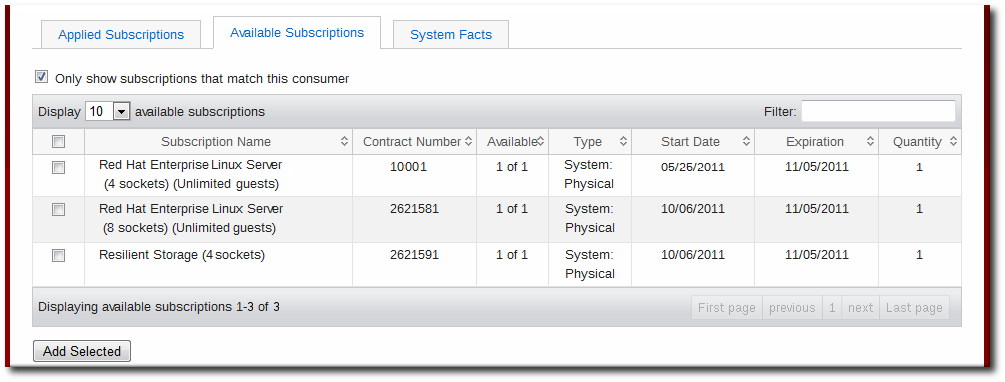
- Once the subscriptions are added, open the Applied Subscriptions tab.
- Click the Download All Certificates button. This exports all of the entitlements certificates, for each product, to a single
.zipfile. Save the file to some kind of portable media, like a flash drive. - Optionally, click the Download Identity Certificate button. This saves the identity certificate for the registered consumer and could be used by the consumer to connect to the subscription service. If the consumer will permanently be offline, then this is not necessary, but if the consumer could ever be brought onto the network, then this is useful.
- Copy the entitlements certificates from the media device over to the consumer.
- If all entitlement certificates were downloaded in an archive file, then there are multiple archives in the downloaded
certificates.zipfile. Unzip the directories until the PEM files for the entitlement certificates are available. - Import the entitlement certificates. This can be done using the Import Certificates button in the Subscription Manager GUI or using the
importcommand. For example:# subscription-manager import --certificate=/tmp/export/entitlement_certificates/596576341785244687.pem --certificate=/tmp/export/entitlement_certificates/3195996649750311162.pem Successfully imported certificate 596576341785244687.pem Successfully imported certificate 3195996649750311162.pem
- If you downloaded an identity certificate, copy the
cert.pemfile directly into the/etc/pki/consumerdirectory. For example:cp /tmp/downloads/cert.pem /etc/pki/consumer