Registering, Unregistering, and Reregistering a System
Entitlements are managed by organizing and maintaining the systems which use entitlement subscriptions. The entitlements and subscriptions are managed by CentOS through the subscription service. A system is recognized to the subscription service by being registered with the service. The subscription service assigns the system (called a consumer) a unique ID (essentially as an inventory number) and issues that system an identifying certificate (with the UUID in its subject CN) to identify that system.
Whenever a subscription is purchased by an organization, the consumer can subscribe to that subscription. This means that a portion of the subscription is allocated to that consumer ID; when the consumer contacts the content delivery network and downloads the software, the licenses have been already assigned to the system. The system has valid certificates for its subscriptions.
Systems can be registered with an subscription service during the firstboot process or as part of the kickstart setup (both described in the Installation Guide). Systems can also be registered after they've been configured or removed from the subscription service inventory (unregistered) if they will no longer be managed within that entitlement system.
For infrastructures which use CentOS's hosted subscription and content delivery network, all that is required to register the system is the username and password of the CentOS Network account.
Infrastructures which manage their own local content repository and subscription service must have a defined organization. This organization is essentially a group definition, and systems must be assigned to that group as part of the registration process. This allows there to be multiple, discrete organizations or tenants within the infrastructure.
When a system is registered using the Subscription Manager GUI, Subscription Manager automatically scans the local subscription and content service to see what organizations are configured.
When the configured organizations are detected, Subscription Manager prompts for the organization for the system to join. It is only possible to register with one organization.
If no environment is selected, then Subscription Manager uses the default environment for the organization.
It is only possible to join an environment during registration. The environments cannot be changed after registration.
Some systems may not have internet connectivity, but administrators still want to assign and track the subscriptions for that system. This can be done by manually registering the system, rather than depending on Subscription Manager to perform the registration. This has two major steps, first to create an entry on the subscriptions service and then to configure the system.
The simplest way to register a machine is to pass the The In a multi-org environment, it is required that you specify which organization (essentially an independent group or unit within the main account) to join the system to. This is done by using the If there is more than one organization, then the system must be assigned to one specific organization: Organizations can be subdivided into environments, which define access to content based on repositories, product versions, and content sets. While a consumer can only belong to a single organization, it can be assigned to multiple environments within that organization. If no environment is given, the subscription service uses the default environment. See "Working with Subscription Asset Manager" for information about organizations and Subscription Asset Manager.
A system can only be added to an environment during registration.
If the system is in a multi-org environment and no organization is given, the The When using the command-line tools to register the system, there is an option that can pass the activation key to apply existing, already-assigned certificates along with the other registration information. The activation keys are set, in a comma-separated list, in the With an activation key, it is not necessary to give a username and password because the authentication is implicit in the activation key.
In hosted or single organization environments, it is not necessary to specify an organization with the For example:
The only thing required to unregister a machine is to run the In the CentOS Subscription Manager GUI, there is an Unregister button at the top of the window in the Tools area.
From the command line, this requires only the There are times when the local registration and subscription information could be lost or corrupted. There could be a hardware failure or system crash. Or other IT considerations may require that a system be moved to a different machine. Whatever the reason, the local subscription configuration is lost.
A system can be registered against an existing system entry in the CentOS subscription service, which essentially restores or reregisters that consumer. The reregister operation uses the original consumer ID with the registration request, so that all of the previous subscriptions associated with the consumer entry are restored along with the registration.
Reregistering a system uses the The Registering Consumers in the Hosted Environment
subscription-manager-gui
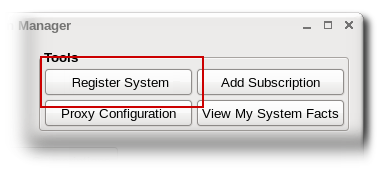

Registering Consumers to a Local Organization
rhsm.conf configuration file points to the local subscription service (in the hostname parameter) and the local content server (in the baseurl parameter). The Subscription Manager configuration is described in "Configuring the Subscription Service".
subscription-manager-gui
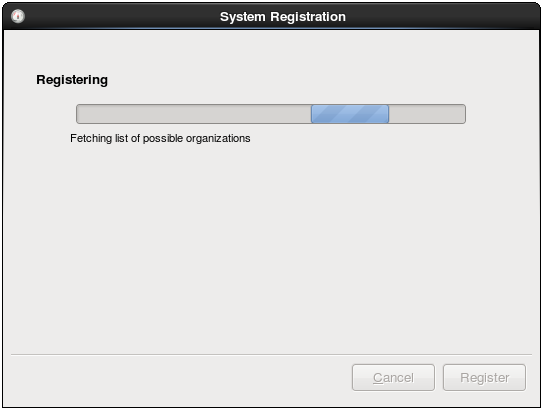
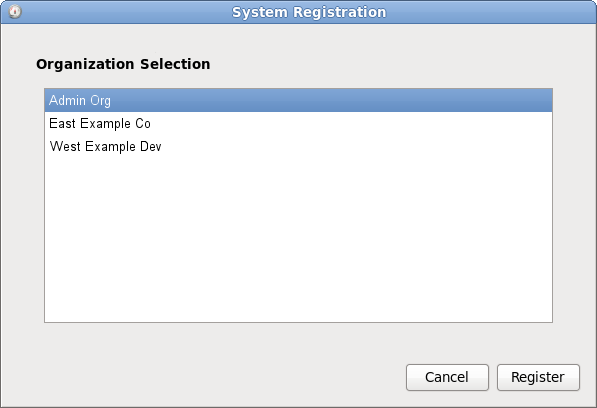
Registering an Offline Consumer

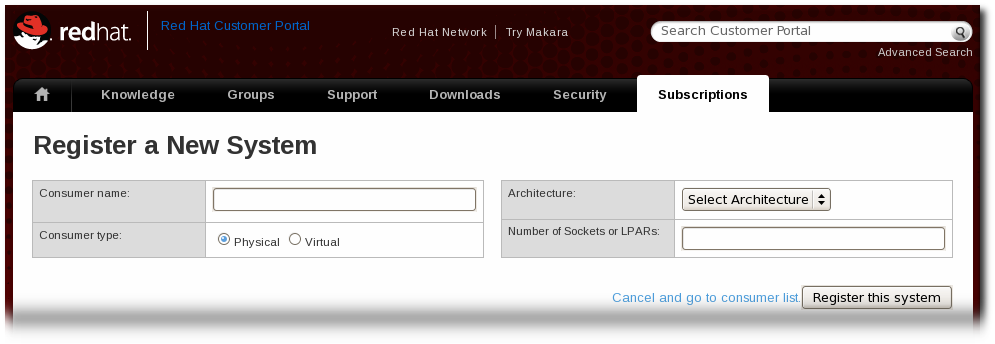
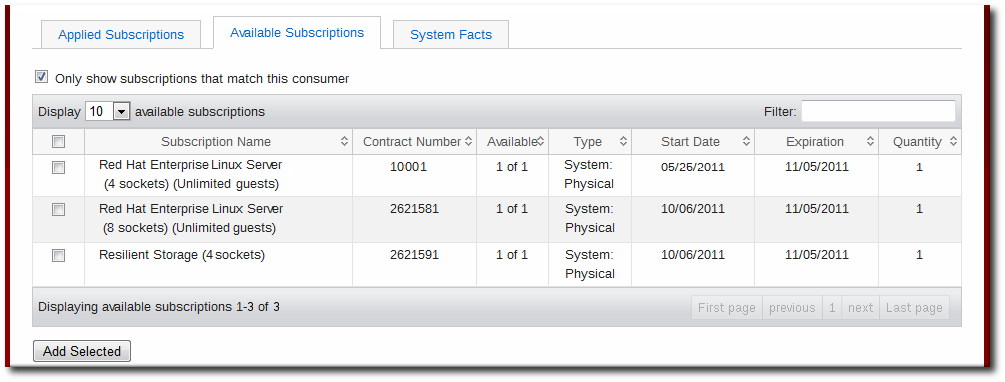
.zip file. Save the file to some kind of portable media, like a flash drive.
certificates.zip file. Unzip the directories until the PEM files for the entitlement certificates are available.
import command. For example:
# subscription-manager import --certificate=/tmp/export/entitlement_certificates/596576341785244687.pem --certificate=/tmp/export/entitlement_certificates/3195996649750311162.pem
Successfully imported certificate 596576341785244687.pem
Successfully imported certificate 3195996649750311162.pem
cert.pem file directly into the /etc/pki/consumer directory. For example:
cp /tmp/downloads/cert.pem /etc/pki/consumer
Registering from the Command Line
register command with the user account information required to authenticate to the Certificate-Based CentOS Network (the credentials used to access subscription service or the Customer Portal). When the system is successfully authenticated, it echoes back the newly-assigned consumer ID and the user account name which registered it.
register options are listed in Table 14.2, "register Options".
Example 14.1. Registering a New Consumer
[root@server1 ~]# subscription-manager register --username admin-example --password secret
7d133d55-876f-4f47-83eb-0ee931cb0a97 admin-example (the new consumer UUID and the account used for registration)
--org option in addition to the username and password. The given user must also have the access permissions to add systems to that organization. (See "Working with Subscription Asset Manager" for information about organizations and Subscription Asset Manager.)
Example 14.2. Registering a New Consumer with an Organization
[root@server1 ~]# subscription-manager register --username admin-example --password secret --org="IT Department"
7d133d55-876f-4f47-83eb-0ee931cb0a97 admin-example (the new consumer UUID and the account used for registration)[root@server1 ~]# subscription-manager register --username admin-example --password secret
--org="IT Department" --environment=Dev1,ITall
register command returns a Remote Server error.
register command has an option, --autosubscribe, which allows the system to be registered to the subscription service and immediately subscribed to the subscription which best matches its architecture in a single step.
Example 14.3. Automatically Subscribing While Registering
[root@server1 ~]# subscription-manager register --username admin-example --password secret
--autosubscribe
Example 14.4. Applying Subscriptions During Registration
--activationkey option.--org option, but in multi-org environments, the --org option is required. The organization is not defined as part of the activation key. See "Working with Subscription Asset Manager" for information about activation keys and Subscription Asset Manager.
# subscription-manager register --activationkey=1234abcd --org="IT Dept"
Table 14.2. register Options
Options
Description
Required
--username=name
Gives the content server user account name.
Required
--password=password
Gives the password for the user account.
Required
--org=name
Gives the organization to which to join the system.
Required, except for hosted environments
--environment=name
Registers the consumer to an environment within an organization.
Optional
--name=machine_name
Sets the name of the consumer (machine) to register. This defaults to be the same as the hostname.
Optional
--autosubscribe
Automatically subscribes this system to the best-matched compatible subscription. This is good for automated setup operations, since the system can be configured in a single step.
Optional
--activation_key
Applies existing subscriptions as part of the registration process. The subscriptions are pre-assigned by a vendor or by a systems administrator using Subscription Asset Manager.
Optional
--force
Registers the system even if it is already registered. Normally, any register operations will fail if the machine is already registered.
Optional Unregistering
unregister command. This removes the system's entry from the subscription service, unsubscribes it from any subscriptions, and, locally, deletes its identity and entitlement certificates.
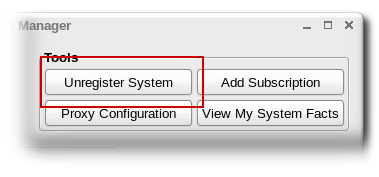
unregister.
Example 14.5. Unregistering a Consumer
[root@server1 ~]# subscription-manager unregister
Restoring a Registration
register command. This command passes the original UUID for a system to issue a request to the subscription service to receive a new certificate using the same UUID. This essentially renews its previous registration.
Example 14.6. Registering a System Against an Existing Identity Certificate
register command uses the original ID to identify itself to the subscription service and restore its previous subscriptions.[root@server1 ~]# subscription-manager register --username admin-example --password secret --consumerid=7d133d55-876f-4f47-83eb-0ee931cb0a97
Table 14.3. register Options to Reregister the System
Options
Description
Required
--consumerid
Gives the consumer UUID used by an existing consumer. The system's consumer entry must exist in the CentOS subscription service for the reregister operation to succeed.
Required
--username=name
Gives the content server user account name.
Optional
--password=password
Gives the password for the user account.
Optional