Tag library file format
A tag library consists of a single root file, the TagLibraries.vtm file, that lists every installed tag, plus a VTML file for each tag in the tag library. The TagLibraries.vtm file functions as a table of contents and contains pointers to each individual tag's VTML file. The following figure shows how Adobe Dreamweaver organizes the VTML files by markup language:
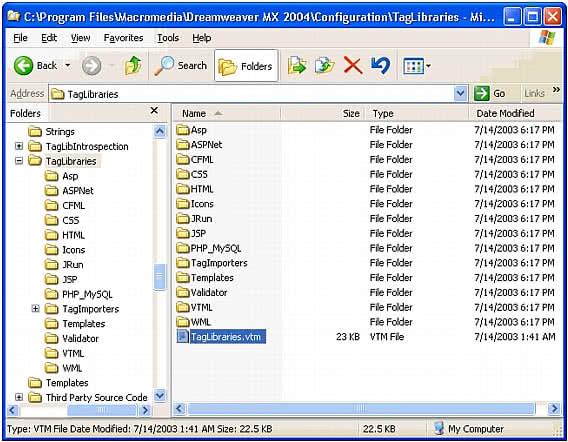
Adobe HomeSite users can recognize the VTML file structure, but Adobe Dreamweaver does not use VTML files in the same way as HomeSite. The most important difference is that Adobe Dreamweaver contains its own HTML renderer that displays extension user interfaces (UIs), so the Adobe Dreamweaver VTML files are not used in the GUI rendering process.
The following example illustrates the structure of the TagLibraries.vtm file:
<taglibraries><taglibrary name="Name of tag library" doctypes="HTML,ASP-JS,ASP-VB" tagchooser="relative path to TagChooser.xml file" id="DWTagLibrary_html"> <tagref name="tag name" file="relative path to tag .vtm file"/></taglibrary><taglibrary name="CFML Tags" doctypes="ColdFusion" servermodel="Cold Fusion" tagchooser="cfml/TagChooser.xml" id="DWTagLibrary_cfml"> <tagref name="cfabort" file="cfml/cfabort.vtm"/></taglibrary><taglibrary name="ASP.NET Tags" doctypes="ASP.NET_CSharp,ASP.NET_VB"¬ servermodel="ASPNet" prefix="<asp:" tagchooser="ASPNet/TagChooser.xml"¬ id="DWTagLibrary_aspnet"> <tagref name="dataset" file="aspnet/dataset.vtm" prefix="<mm:dataset"/></taglibrary> </taglibraries>
The taglibrary tag groups one or more tags into a tag library. When you import tags or create a new set of tags, you can group them into tag libraries. Typically, a taglibrary grouping corresponds to a set of tags that are defined in a JavaServer Pages (JSP) TLD file, an XML document type definition (DTD) file, an ASP.Net name space, or some other logical grouping.
The following table lists the taglibrary attributes:
Attribute | Description | Mandatory/optional |
|---|---|---|
taglibary.name | Used to refer to the tag library in the UI. | Mandatory |
taglibrary.doctypes | Indicates the document types for which this library is active. When the library is active, library tags appear in the Code Hints pop-up menu. Not all tag libraries can be active at the same time because name conflicts can occur (for example, HTML and WML files are incompatible). | Mandatory |
taglibrary.prefix | When specified, tags within the tag library have the form | Optional |
taglibrary.servermodel | If the tags in the tag library execute on an application server, the | Optional |
taglibrary.id | This can be any string that is different from the | Optional |
taglibrary.tagchooser | A relative path to the TagChooser.xml file that is associated with this tag library. | Optional |
The following table lists tagref attributes:
Attribute | Description | Mandatory/optional |
|---|---|---|
tagref.name | Used to refer to the tag in the UI. | Mandatory |
tagref.prefix | Specifies how the tag appears in Source view. When used, the | Optional |
tagref.file | References the VTML file for the tag. | Optional |
Because the tagref.prefix attribute can override the taglibrary.prefix attribute, the relationship between the two attributes can be confusing. The following table shows the relationship between the taglibrary.prefix and tagref.prefix attributes:
Is the taglibrary.prefix defined? | Is the tagref.prefix defined? | Resulting tag prefix |
|---|---|---|
No | No | '<' + tagref.name |
Yes | No | taglibrary.prefix + tagref.name |
No | Yes | tagref.prefix |
Yes | Yes | tagref.prefix |
To define tags, Adobe Dreamweaver uses a modified version of the Adobe VTML file format. The following example demonstrates all the elements that Adobe Dreamweaver must use to define an individual tag:
<tag name="input" bind="value" casesensitive="no" endtag="no"> <tagformat indentcontents="yes" formatcontents="yes" nlbeforetag ¬ nlbeforecontents=0 nlaftercontents=0 nlaftertag=1 /> <tagdialog file = "input.HTM"/> <attributes> <attrib name="name"/> <attrib name="wrap" type="Enumerated"> <attriboption value="off"/> <attriboption value="soft"/> <attriboption value="hard"/> </attrib> <attrib name="onFocus" casesensitive="yes"/> <event name="onFocus"/> </attributes></tag>
The following table lists the attributes that define tags:
Attribute | Description | Mandatory/optional |
|---|---|---|
tag.bind | Used by the Data Binding panel. When you select a tag of this type, the | Optional |
tag.casesensitive | Specifies whether the tag name is case-sensitive. If the tag is case-sensitive, it is inserted into the user's document using exactly the case that the tag library specifies. If the tag is not case-sensitive, it is inserted using the default case that is specified in the Code Format tab in the Preferences dialog box. If | Optional |
tag.endtag | Specifies whether the tag has both an opening and a closing tag. For example, the | Optional |
tagformat | Specifies the tag's formatting rules. In Adobe Dreamweaver versions before Adobe Dreamweaver MX, these rules were stored in the SourceFormat.txt file. | Optional |
tagformat.indentcontents | Specifies whether the contents of this tag should be indented. | Optional |
tagformat.formatcontents | Specifies whether the contents of this tag should be parsed. This attribute is set to | Optional |
tagformat.nlbeforetag | The number of newline characters to insert before this tag. | Optional |
tagformat.nlbeforecontents | The number of newline characters to insert before the contents of this tag. | Optional |
tagformat.nlaftercontents | The number of newline characters to insert after the contents of this tag. | Optional |
tagformat.nlaftertag | The number of newline characters to insert after this tag. | Optional |
attrib.name | The name of the attribute, as it appears in the source code. | Mandatory |
attrib.type | If omitted, It can have the following values:
| Optional |
attrib.casesensitive | Specifies whether the attribute name is case-sensitive. If the | Optional |
NOTE | In versions before Adobe Dreamweaver MX, tag information is stored in the Configuration/TagAttributeList.txt file. |