Creating the dynamic menu items
The following menu tags in the menus.xml file define the Preview in Browser submenu of the File menu:
<menu name="_Preview in Browser" id="DWMenu_File_PIB"> <menuitem dynamic name="No Browsers Selected" file="Menus/MM/PIB_Dynamic.htm" arguments="'No Browsers'" id="DWMenu_File_PIB_Default" /> <separator /> <menuitem name="_Edit Browser List..." enabled="true" command="dw.editBrowserList()" id="DWMenu_File_PIB_EditBrowserList" /> </menu>
The first menuitem tag defines the default menu item No Browsers Selected, which appears on the submenu if you have not specified any browsers for the Preview in Browser item in Preferences. If you specified the Microsoft Internet Explorer browser, however, the submenu would look like the following figure:
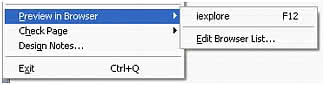
The name attribute for the first menu item specifies the command file PIB_Dynamic.htm. This file contains the following line:
<SCRIPT LANGUAGE="javascript" SRC="PIB_Dynamic.js"></SCRIPT>
The script tag includes the JavaScript code in the PIB_Dynamic.js file, which supplies the JavaScript code that interacts with the Preview in Browser submenu. This code could be saved directly in the PIB_Dynamic.htm file, but storing it in a separate file allows multiple commands to include the same code.