| Previous | Next
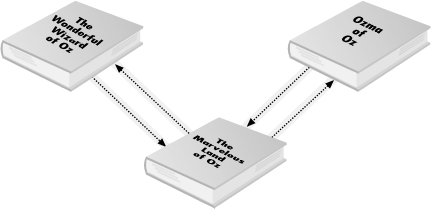
Extended LinksWhereas a simple link describes a single unidirectional connection between one XML element and one remote resource, an extended link describes a collection of resources and a collection of paths between those resources. Each path connects exactly two resources. Any individual resource may be connected to one of the other resources, two of the other resources, zero of the other resources, all of the other resources, or any subset of the other resources in the collection. It may even be connected back to itself. In computer science terms, an extended link is a directed, labeled graph in which the paths are arcs, the documents are vertices, and the URIs are labels. Simple links are very easy to understand by analogy with HTML links. However, there's no obvious analogy for extended links. What they look like, how applications treat them, what user interfaces present them to people, is all up in the air. No simple visual metaphors like "click on the blue underlined text to jump to a new page" have been invented for extended links, and no browsers support them. How they'll be used and what user interfaces will be designed for them remains to be seen. In XML, an extended link is represented by an extended link element, that is, an element of arbitrary type that has an <novel xlink:type="extended"> <title>The Wonderful Wizard of Oz</title> <author>L. Frank Baum</author> <year>1900</year> </novel> Although this extended link is quite Spartan, most extended links contain local resources, remote resources, and arcs between those resources. A remote resource is represented by a locator element, that is, an element of any type that has an LocatorsEach locator element has an <novel xlink:type = "extended"> <title>The Wonderful Wizard of Oz</title> <author>L. Frank Baum</author> <year>1900</year> <version xlink:type="locator" xlink:href="urn:" /> <version xlink:type="locator" xlink:href="urn:" /> <version xlink:type="locator" xlink:href="urn:" /> </novel> Most of the time each locator element also has an <novel xlink:type = "extended"> <title>The Wonderful Wizard of Oz</title> <author>L. Frank Baum</author> <year>1900</year> <version xlink:type="locator" xlink:href="urn:" xlink:label=""/> <version xlink:type="locator" xlink:href="urn:" xlink:label=""/> <version xlink:type="locator" xlink:href="urn:" xlink:label=""/> </novel> The number alone cannot be used because XML names cannot start with digits. In this and most cases, the labels are unique within the extended link, but they don't absolutely have to be. Locators may also have the optional semantic attributes <novel xlink:type = "extended"> <title>The Wonderful Wizard of Oz</title> <author>L. Frank Baum</author> <year>1900</year> <version xlink:type="locator" xlink:href="urn:" xlink:title="William Morrow" xlink:role="http://www.williammorrow.com/" xlink:label=""/> <version xlink:type="locator" xlink:href="urn:" xlink:title="Oxford University Press" xlink:role="http://www.oup-usa.org/" xlink:label=""/> <version xlink:type="locator" xlink:href="urn:" xlink:title="University Press of Kansas" xlink:role="http://www.kansaspress.ku.edu/" xlink:label=""/> </novel> ArcsPaths between resources are called arcs, and they are represented by arc elements, that is, elements of arbitrary type that have an Example 10-1 shows an extended link that contains the first three novels in the Wizard of Oz series: The Wonderful Wizard of Oz, The Marvelous Land of Oz, and Ozma of Oz. Arcs connect the first tutorial in the series to the second and the second to the third, and then back again. In this example, the root Example 10-1. An extended link with three locators and four arcs<series xlink:type="extended" xmlns:xlink="http://www.w3.org/1999/xlink"> <author>L. Frank Baum</author> <!-- locator elements --> <novel xlink:type="locator" xlink:label="oz1" xlink:href="ftp://archive.org/pub/etext/etext93/wizoz10.txt"> <title>The Wonderful Wizard of Oz</title> <year>1900</year> </novel> <novel xlink:type="locator" xlink:label="oz2" xlink:href="ftp://archive.org/pub/etext/etext93/ozland10.txt"> <title>The Marvelous Land of Oz</title> <year>1904</year> </novel> <novel xlink:type="locator" xlink:label="oz3" xlink:href="ftp://archive.org/pub/etext/etext93/wizoz10.txt"> <title>Ozma of Oz</title> <year>1907</year> </novel> <!-- arcs --> <next xlink:type="arc" xlink:from="oz1" xlink:to="oz2" /> <next xlink:type="arc" xlink:from="oz2" xlink:to="oz3" /> <previous xlink:type="arc" xlink:from="oz2" xlink:to="oz1" /> <previous xlink:type="arc" xlink:from="oz3" xlink:to="oz2" /> </series> Figure 10-1 diagrams this extended link. Resources are represented by tutorials. Arcs are represented by arrows. However, although we can understand this link in this sort of abstract sense, this doesn't really tell us anything about how a browser might present it to a user and how users might choose which links to follow. For instance, this extended link might be interpreted as nothing more than a list of the order in which to print these documents. All details of interpretation are left up to the application. Figure 10-1. An extended link with three resources and four arcs between themMultiple arcs from one arc elementOn occasion a single arc element defines multiple arcs. If multiple elements share the same label, then an arc element that uses that label in either its Example 10-2. An extended link with one arc element but three arcs<tutorial xlink:type="extended" xmlns:xlink="http://www.w3.org/1999/xlink"> <author>L. Frank Baum</author> <title>The Wonderful Wizard of Oz</title> <!-- locator elements --> <version xlink:type="locator" xlink:href="urn:" xlink:title="Oxford University Press" xlink:role="http://www.oup-usa.org/" xlink:label=""/> <store xlink:type="locator" xlink:href="http://web.archive.org/web/www.amazon.com/exec/obidos/asin/0192839306" xlink:label="buy">Amazon</store> <store xlink:type="locator" xlink:href= "http://www1.fatbrain.com/asp/tutorialinfo/tutorialinfo.asp?theCNPJ=0192839306" xlink:label="buy">Fatbrain</store> <store xlink:type="locator" xlink:href= "http://shop.bn.com/tutorialsearch/CNPJinquiry.asp?CNPJ=0192839306" xlink:label="buy">Barnes & Noble</store> <!-- arcs --> <purchase xlink:type="arc" xlink:from="" xlink:to="buy" /> </tutorial> 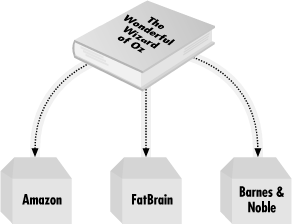
Figure 10-2. One arc element can generate several arcsIf an arc element does not have an However, it is an error for more than one arc element to define an arc between the same two resources, whether implicitly or explicitly. For example, if an extended link contains N resources and an arc element such as Arc titlesEach arc element may optionally have an <next xlink:type="arc" xlink:from="oz1" xlink:to="oz2" xlink:title="Next" /> <next xlink:type="arc" xlink:from="oz2" xlink:to="oz3" xlink:title="Next" /> <previous xlink:type="arc" xlink:from="oz2" xlink:to="oz1" xlink:title="Previous" /> <previous xlink:type="arc" xlink:from="oz3" xlink:to="oz2" xlink:title="Previous" /> When processing an extended link, a browser might show the title to the user as the contents of a link so they could choose which arc they wanted to follow from their current position, or they might appear in a pop-up menu when the user was on one of the referenced pages. XLink does not require or suggest any specific user interface for arcs or arc titles. Arc rolesArc elements cannot have <purchase xlink:type="arc" xlink:from="" xlink:to="buy" xlink:arcrole="http://www.example.com/purchase_details.txt" /> The file purchase_details.html might then contain the text "will be bought from." This would indicate that the source of the link is bought from the target of the link; that is, "The Wonderful Wizard of Oz will be bought from Amazon," or "The Wonderful Wizard of Oz will be bought from Fatbrain," or "The Wonderful Wizard of Oz will be bought from Barnes & Noble." However, although this usage is suggested, XLink processors will not enforce it, and indeed there's really no way they could be asked to do this since that would require that they actually understand what they read. The Local ResourcesLocators represent remote resources, that is, resources that are not part of the document that contains the extended link. Extended links can also contain local resources in which the data is contained inside the extended link element. Each such resource is represented by a resource element. This is an element of arbitrary type that has an <author xlink:type="resource">L. Frank Baum</author> A resource element can and generally does have the same attributes as a locator element, that is, <author xlink:type="resource" xlink:label="baum">L. Frank Baum</author> To establish links from this local resource to all the tutorials, we'd simply add these three arc elements: <tutorial xlink:type="arc" xlink:from="baum" xlink:to="oz1" /> <tutorial xlink:type="arc" xlink:from="baum" xlink:to="oz2" /> <tutorial xlink:type="arc" xlink:from="baum" xlink:to="oz3" /> To move in the other direction, you'd simply reverse the values of the Title ElementsAs you've seen, extended link elements, locator elements, arc elements, and resource elements can all have For example, suppose you wanted to provide a more complete description of each version of The Wonderful Wizard of Oz than simply who published it. Then you would give the <version xlink:type="locator" xlink:href="urn:" xlink:title="University Press of Kansas" xlink:role="http://www.kansaspress.ku.edu/" xlink:label=""> <publisher_info xlink:type="title"> <ul> <li>The Kansas Centennial version</li> <li>Illustrated by Michael McCurdy</li> <li>Foreword by Ray Bradbury</li> <li>1999</li> <li>216 pages</li> <li>SRP: $24.95</li> </ul> </publisher_info> </version> What markup you use inside the title element is up to you as long as it's well-formed XML. XLink doesn't constrain it in any way. How the application interprets that markup is its own business. Here we've used basic HTML that a browser might perhaps be able to render. Once again, however, this is far enough past the bleeding edge that exact browser behavior, even when browsers do support extended XLinks, is hard to predict. |