| Previous | Next
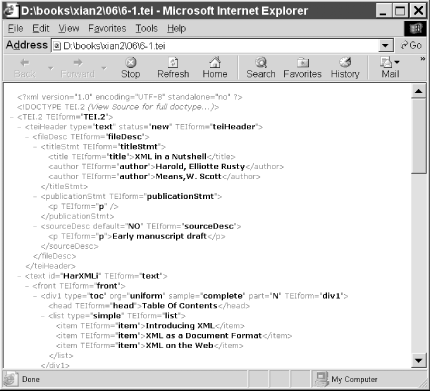
Direct Display of XML in BrowsersUltimately, one hopes that browsers will be able to display not just XHTML documents but any XML document as well. Since it's too much to ask that browsers provide semantics for all XML applications both current and yet-to-be-invented, stylesheets will be attached to each document to provide instructions about how each element will be rendered. The current major stylesheet languages are: Eventually, there will be still more versions of these, including at least CSS3 and XSLT 2.0. However, let's begin by looking at how and how well existing style languages are supported by existing browsers. The xml-stylesheet Processing InstructionThe stylesheet associated with a document is indicated by an The required href and type pseudoattributesThere are two required pseudoattributes for Example 7-3. A very simple yet complete XML document<?xml version="1.0"?> <?xml-stylesheet href="person.css" ?> <person> Alan Turing </person> TIP: Microsoft Internet Explorer uses In addition to these two required pseudoattributes, there are four optional pseudoattributes:
The media pseudoattributeThe
For example, this <?xml-stylesheet href="http://web.archive.org/web/www.cafeconleche.org/style/titus.css" media="tv, projection, print"?> The charset pseudoattributeThe <?xml-stylesheet href="koran.css" charset="ISO-8859-6"?> The alternate and title pseudoattributesThe <?xml-stylesheet href="big.css" alternate="yes" title="Large fonts"?> <?xml-stylesheet href="small.css" alternate="yes" title="Small fonts"?> <?xml-stylesheet href="medium.css" title="Normal fonts"?> Browsers that aren't able to ask the user to choose a stylesheet will simply pick the first nonalternate sheet that most closely matches its media-type ( Internet ExplorerMicrosoft Internet Explorer 4.0 (IE4) includes an XML parser that can be accessed from VBScript or JavaScript. This is used internally to support channels and the Active Desktop. Your own JavaScript and VBScript programs can use this parser to read XML data and insert it into the web page. However, anything more straightforward, like simply displaying a page of XML from a specified URL, is beyond IE4's capabilities. Furthermore, IE4 doesn't understand any stylesheet language when applied to XML. Internet Explorer 5 (IE5) and 5.5 (IE 5.5) do understand XML, though their parser is more than a little buggy; it rejects a number of documents it shouldn't reject, most embarrassingly the XML 1.0 specification itself. Internet Explorer 6 (IE6) has improved XML support somewhat, but is still not completely conformant. IE5 and later can directly display XML files, with or without an associated stylesheet. If no stylesheet is provided, then IE5 uses a default, built-in XSLT stylesheet that displays the tree structure of the XML document along with a little DHTML to allow the user to collapse and expand nodes in the tree. Figure 7-1 shows IE5 displaying Example 6-1 from the last chapter. Figure 7-1. A document that uses IE5's built-in stylesheetIE5 also supports parts of CSS Level 1 and a little of CSS Level 2. However, the support is spotty and inconsistent. Even some aspects of CSS that work for HTML documents fail when applied to XML documents. IE 5.5 and IE6 slightly improve coverage of CSS, but don't support all CSS properties and selectors. In fact, many CSS features that work in IE6 for HTML still don't work when applied to XML documents. IE5 and IE 5.5 support their own custom version of XSLT, based on a very early working draft of the XSLT specification. They do not support XSLT 1.0. You can tell the difference by looking at the namespace of the stylesheet. A stylesheet written for IE5 uses the http://www.w3.org/TR/WD-xsl namespace, whereas a stylesheet designed for standard-compliant XSLT processors uses the http://www.w3.org/1999/XSL/Transform namespace. Despite superficial similarities, these two languages are not compatible. A stylesheet written for IE5 will not work with any other XSLT processor, and a stylesheet written using standard XSLT 1.0 will not work in IE5. IE6 supports both real XSLT and Microsoft's nonstandard dialect. Netscape and MozillaNetscape 4.x and earlier do not provide any significant support for displaying XML in the browser. Netscape 4.0.6 and later do use XML internally for some features such as "What's Related." However, the parser used isn't accessible to the page author, even through JavaScript. Mozilla and Netscape 6.0 do fully support display of XML in the browser. CSS Level 2 is completely supported. Mozilla can read an XML web page, download the associated CSS stylesheet, apply it to the document, and display the result to the end user, all completely automatically and more or less exactly as XML on the Web was always meant to work. Netscape 6.2 also supports XSLT 1.0, but at the time of this writing the support is fairly buggy, and really hard to get working. You have to serve the files from a web server (not the local disk) and the web server must supply the exactly right MIME media types for the XML document and its stylesheet. Even then the transform fails about half the time. Mozilla 1.0 does have the best XSLT support of any current browser, so it seems likely that future versions of Netscape 6 (which is based on earlier betas of Mozilla) will do a better job. Mozilla also partially supports MathML; and there's a third party effort underway to support SVG graphics. However, this probably won't be ready for Mozilla 1.0. Alternative ApproachesAuthoring your web pages in XML does not necessarily require serving them in XML. Fourth-generation and earlier browsers that don't support XML in any significant way will be with us for years to come. Servicing users with these browsers requires standard, ordinary HTML that works in any browser back to Mosaic 1.0. One popular option is to write the pages in XML, but serve them in HTML. When the server receives a request for an XML document, it automatically converts the document to HTML and sends the converted document instead. More sophisticated servers can cache the converted documents. They can also recognize browsers that support XML and send them the raw XML instead. The preferred way to perform the conversion is with an XSLT stylesheet and a Java servlet. Indeed, most XSLT engines such as Xalan-J and SAXON include servlets that do exactly this. However, other schemes are possible, for instance, using PHP or CGI instead of a servlet. The key is to make sure that browsers only receive what they know how to read and display. We'll talk more about XSLT in the next chapter. |