| Previous | Next
Element DeclarationsEvery element used in a valid document must be declared in the document's DTD with an element declaration. Element declarations have this basic form: <!ELEMENT The name of the element can be any legal XML name. The content specification specifies what children the element may or must have in what order. Content specifications can be quite complex. They can say, for example, that an element must have three child elements of a given type, or two children of one type followed by another element of a second type, or any elements chosen from seven different types interspersed with text. #PCDATAAbout the simplest content specification is one that says an element may only contain parsed character data, but may not contain any child elements of any type. In this case the content specification consists of the keyword <!ELEMENT phone_number (#PCDATA)> Child ElementsAnother simple content specification is one that says the element must have exactly one child of a given type. In this case, the content specification simply consists of the name of the child element inside parentheses. For example, this declaration says that a <!ELEMENT fax (phone_number)> A SequencesIn practice, however, a content specification that lists exactly one child element is rare. Most elements contain either parsed character data or (at least potentially) multiple child elements. The simplest way to indicate multiple child elements is to separate them with commas. This is called a sequence. It indicates that the named elements must appear in the specified order. For example, this element declaration says that a <!ELEMENT name (first_name, last_name)> Given this declaration, this <name> <first_name>Madonna</first_name> <last_name>Ciconne</last_name> </name> However, this one is not valid because it flips the order of two elements: <name> <last_name>Ciconne</last_name> <first_name>Madonna</first_name> </name> This element is invalid because it omits the <name> <first_name>Madonna</first_name> </name> This one is invalid because it adds a <name> <first_name>Madonna</first_name> <middle_name>Louise</middle_name> <last_name>Ciconne</last_name> </name> The Number of ChildrenAs the previous examples indicate, not all instances of a given element necessarily have exactly the same children. You can affix one of three suffixes to an element name in a content specification to indicate how many of that element are expected at that position. These suffixes are:
For example, this declaration says that a <!ELEMENT name (first_name, middle_name?, last_name?)> Given this declaration, all these <name> <first_name>Madonna</first_name> <last_name>Ciconne</last_name> </name> <name> <first_name>Madonna</first_name> <middle_name>Louise</middle_name> <last_name>Ciconne</last_name> </name> <name> <first_name>Madonna</first_name> </name> However, these are not valid: <name> <first_name>George</first_name> <!-- only one middle name is allowed --> <middle_name>Herbert</middle_name> <middle_name>Walker</middle_name> <last_name>Bush</last_name> </name> <name> <!-- first name must precede last name --> <last_name>Ciconne</last_name> <first_name>Madonna</first_name> </name> You can allow for multiple middle names by placing an asterisk after the <!ELEMENT name (first_name, middle_name*, last_name?)> If you wanted to require a <!ELEMENT name (first_name, middle_name+, last_name?)> ChoicesSometimes one instance of an element may contain one kind of child, and another instance may contain a different child. This can be indicated with a choice. A choice is a list of element names separated by vertical bars. For example, this declaration says that a <!ELEMENT methodResponse (params | fault)> However, it cannot contain both at once. Each Choices can be extended to an indefinite number of possible elements. For example, this declaration says that each <!ELEMENT digit (zero | one | two | three | four | five | six | seven | eight | nine) > ParenthesesIndividually, choices, sequences, and suffixes are fairly limited. However, they can be combined in arbitrarily complex fashions to describe most reasonable content models. Either a choice or a sequence can be enclosed in parentheses. When so enclosed, the choice or sequence can be suffixed with a For example, let's suppose you want to say that a <!ELEMENT circle (center, (radius | diameter))> To continue with a geometry example, suppose a
Suppose you don't really care whether the
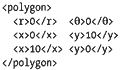
As the number of elements in the sequence grows, the number of permutations grows more than exponentially. Thus, this technique really isn't practical past two or three child elements. DTDs are not very good at saying you want n instances of A and m instances of B, but you don't really care which order they come in. Suffixes can be applied to parenthesized elements too. For instance, let's suppose that a polygon is defined by individual coordinates for each vertex, given in order. For example, this is a right triangle: What we want to say is that a polygon is composed of three or more pairs of x-y or r- The plus sign is applied to To return to the name example, suppose you want to say that a name can contain just a first name, just a last name, or a first name and a last name with an indefinite number of middle names. This declaration achieves that: <!ELEMENT name (last_name | (first_name, ( (middle_name+, last_name) | (last_name?) ) ) > Mixed ContentIn narrative documents it's common for a single element to contain both child elements and un-marked up, nonwhitespace character data. For example, recall this <definition>The <term>Turing Machine</term> is an abstract finite state automaton with infinite memory that can be proven equivalent to any any other finite state automaton with arbitrarily large memory. Thus what is true for a Turing machine is true for all equivalent machines no matter how implemented. </definition> The <!ELEMENT definition (#PCDATA | term)*> This says that a You can add any number of other child elements to the list of mixed content, though <!ELEMENT paragraph (#PCDATA | name | profession | footnote | emphasize | date )* > This is the only way to indicate that an element contains mixed content. You cannot say, for example, that there must be exactly one Empty ElementsSome elements do not have any content at all. These are called empty elements and are sometimes written with a closing <image source="bus.jpg" alt="Alan Turing standing in front of a bus" /> These elements are declared by using the keyword <!ELEMENT image EMPTY> This merely says that the <image source="bus.jpg" alt="Alan Turing standing in front of a bus"></image> If an element is empty, then it can contain nothing, not even whitespace. For instance, this is an invalid <image source="bus.jpg" alt="Alan Turing standing in front of a bus"> </image> ANYVery loose DTDs occasionally want to say that an element exists without making any assertions about what it may or may not contain. In this case you can specify the keyword <!ELEMENT page ANY> The children that actually appear in the
|
 . We would declare this using two small sequences, each of which is parenthesized and combined in a choice: